See the context before you trust the answer.
Open one turn and see exactly what ZUS assembled and sent. What it cannot measure, it says so, rather than printing a zero.
system prompt · history · attachments · tokens
Delegate real engineering work. Come back knowing what changed, what was proven, and what needs your judgment next.
Desktop · Invite-only early access · English & Vietnamese
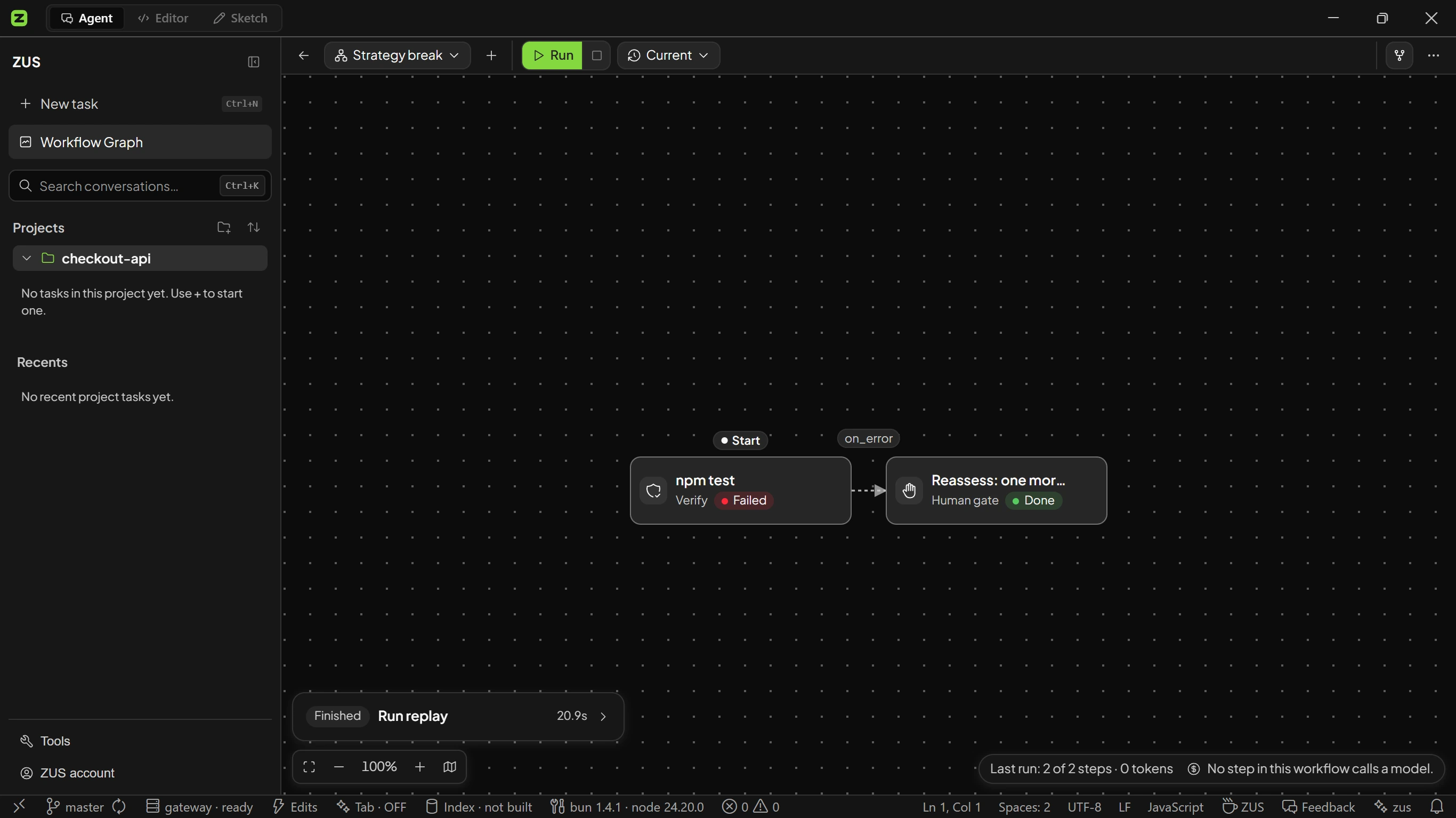
ZUS keeps the important engineering state attached to the work, so returning does not mean reconstructing the entire conversation.
What changed
Every settled run closes into a record. One read tells you which steps the run took and why it moved the way it did.
What needs you
A human gate holds the run at the consequential step. Approve it or send it back with a note, and that note stays on the step inside the run record.
What was checked
Verification steps report pass, fail and unknown separately, so a step that never ran a check can never read as green.
The whole life of one task you hand off and take back.
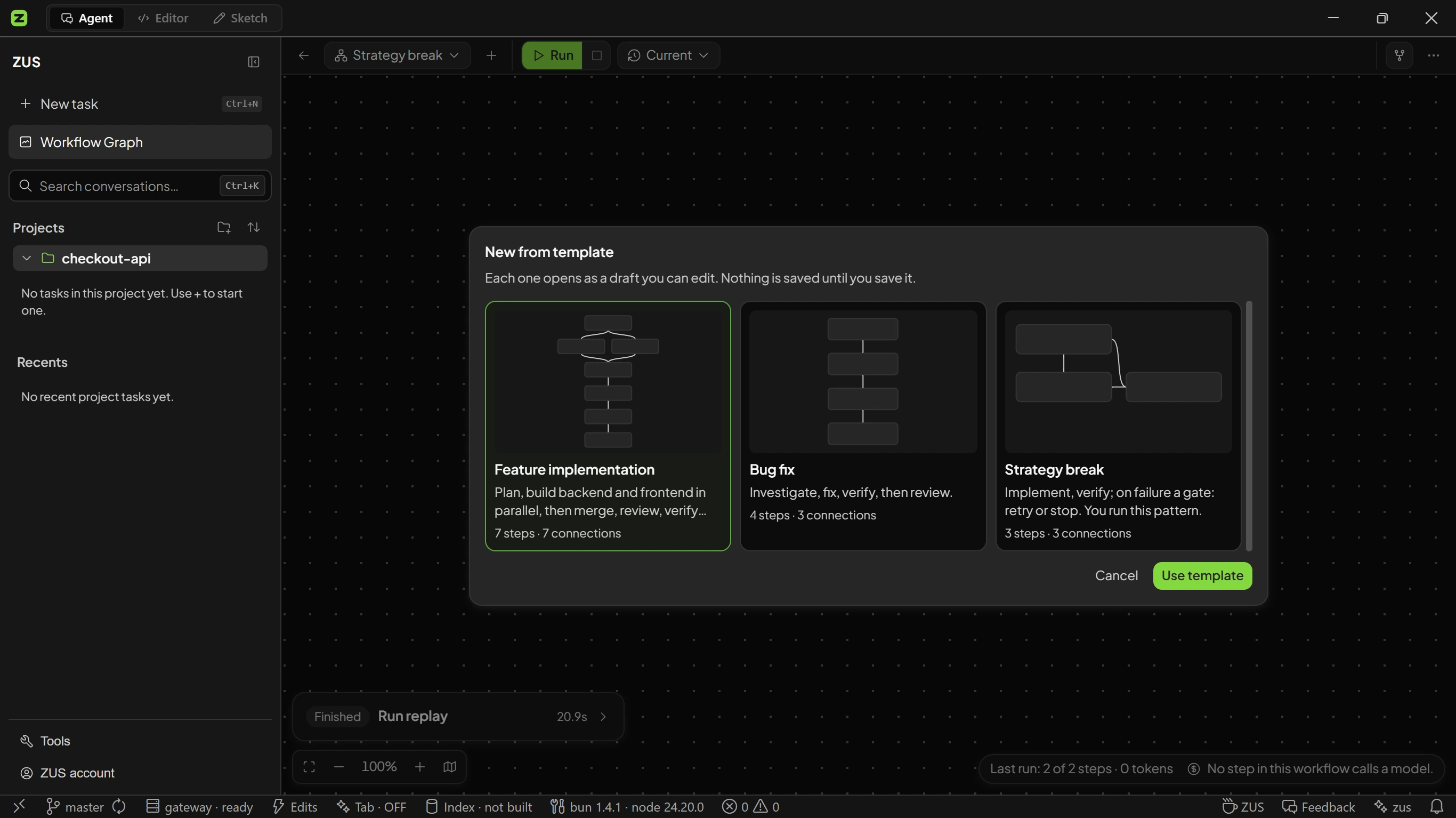
Start from a workflow template or build the graph yourself. Steps, branches and human gates are all part of the shape.
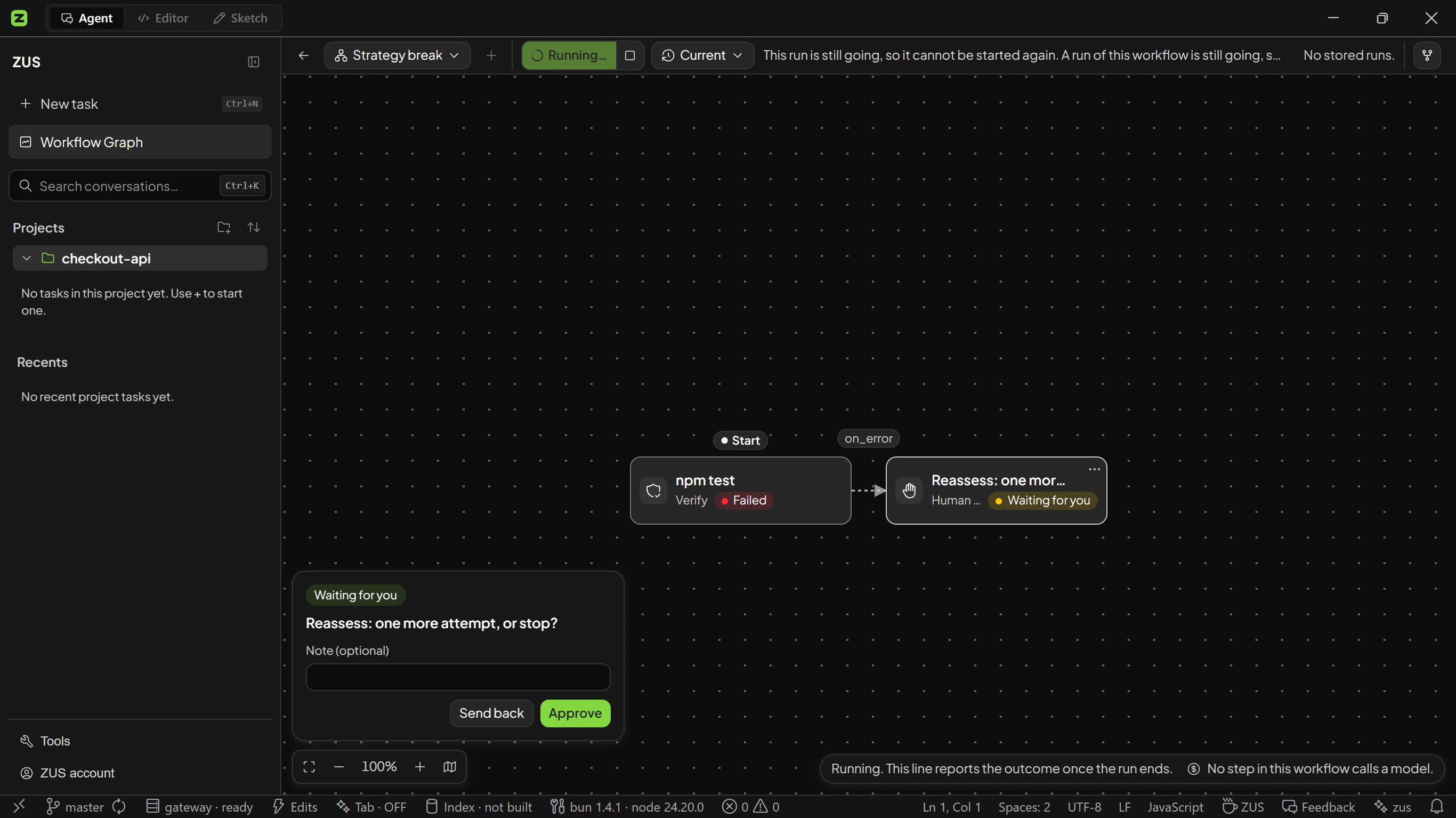
The run holds at the gate you placed. Approve, or send it back with a note the run keeps.
One structured card: what you asked, what changed, the gate decisions, how far verification got, and what still needs you. No scrolling through tool calls.
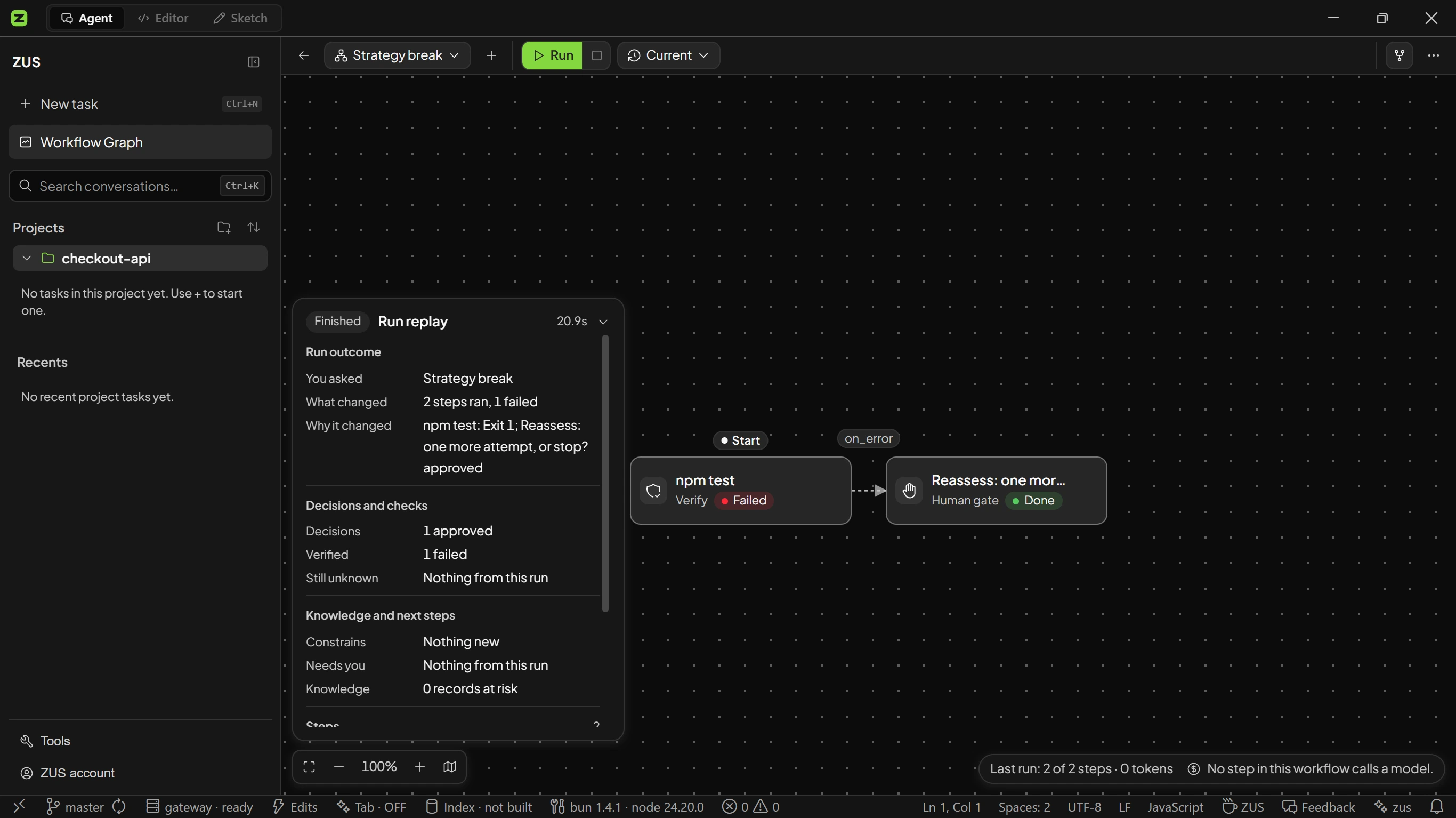
Stored runs keep their graph revision, per-step timing and output, so you can replay a run or compare it with another one.
A run in ZUS is not only edit steps. It can investigate, run the checks itself, or stop and wait for you before the next expensive commitment.
The feature template plans, builds backend and frontend in parallel, then merges and reviews. No detour when the work is understood.
The bug-fix template opens with an investigate step, not an edit. A verify step runs the real command and carries its real exit status.
A human gate blocks the run and shows its question. The card reads Waiting for you, and nothing is inferred from your silence.
Diagram: a request routes either straight to a fix step when the path is clear, or through an investigate step when it is not. Every fix goes through a verify step; a failure stops at a human gate that either retries the fix or ends the run, and a pass leads to review.
See the context, the checks and the remaining unknowns behind a completion claim. Every surface below opens inside the app.
Open one turn and see exactly what ZUS assembled and sent. What it cannot measure, it says so, rather than printing a zero.
system prompt · history · attachments · tokens
A network ledger records the requests ZUS makes. Filter it to outbound only, or export CSV and JSON.
host · method · bytes out · bytes in · subsystem · direction
Grants are per workspace and revocable in Settings. Anything that sends data out always asks.
If the file changed after the agent wrote it, the restore stops and says so.
Each session carries a token ceiling. At the limit the next turn is held back, not sent.
A small follow-up should not hide the larger body of delegated work you still have to review.
The conversation can move on. The engineering history should not disappear.
The ledger covers the open app session. Closing ZUS clears it.
Start from the outcome. Go deeper into workflows, evidence, permissions and policy only when the work calls for it.
Three workflow templates ship today. Each one opens as a draft you can edit before anything runs.
7 steps · 7 links
Plan, build backend and frontend in parallel, then merge, review, verify and wait for you at a gate.
4 steps
Investigate, fix, verify, then review, with the verification result attached to the run record.
retry loop + gate
Implement and verify; on failure the run stops at a gate that asks whether to try once more or stop.
Run records, knowledge and index-heavy data stay on your machine; model requests send the prompt and context needed for inference.
Tauri 2 with a Rust core, not Electron. The workbench, terminal, git and search are part of the app.
The workbench and agent surfaces ship both languages; a few newer inspection panes are English-only for now.
The update manifest is signature-checked before it is parsed. An unsigned or invalid manifest is dropped, not trusted.
Releases publish SHA256SUMS plus signatures so you can verify a download yourself.
Pick the autonomy level, scope what the agent may touch, and keep a token ceiling on the session.
early access
Leave your email and we will send an invite when your spot opens. Role and OS are optional, and they help us decide who to invite first.
lightweight, measured
Installer size is not performance, but it is the one number you can verify yourself before downloading.
Installer Win x64
1 block = one ZUS installer (22.3 MB)
Installed (Linux .deb)ZUS 74.4 MB · VS Code < 500 MB (official MS figure)
AI pricingZUS Free + daily limit · VS Code Copilot $10/mo · Cursor $20/mo
Measured on 2026-07-15 from the real downloaded files: ZUS_1.1.0_x64-setup.exe, VSCodeUserSetup-x64-1.128.1.exe, CursorUserSetup-x64-3.11.19.exe. Trae: we could not measure it, so no number is printed. Prices come from each vendor's official pricing page.
This is not "better than VS Code at everything": ZUS is its own editor, familiar to VS Code users, with an agent built in, in a much smaller install.
A run record: what you asked, which steps ran and which failed, the gate decisions, how far verification got, and what still needs your judgment. It is one card on the workflow canvas, not a transcript to re-read.
The prompt and context needed to answer, sent to the ZUS gateway. Run records, knowledge and index data stay local. The network ledger inside the app lists the requests ZUS made, with bytes and host, and exports to CSV or JSON.
It means a verification step ran and reported a result. Pass, fail and unknown are separate states. An unverified step is never shown as a passing one.
ZUS is its own editor, familiar if you come from VS Code, with an agent, workflow graphs and run records built in. The honest downsides: fewer AI choices, a smaller extension ecosystem, and competitor communities are bigger.
Yes, if you download the installer by hand: it is not certificate-signed yet, so Windows asks. Cross-check the verification code on the download page, then choose More info and Run anyway. Installing via winget or scoop skips this step.
Free, with a daily AI usage limit. Your remaining limit shows in the app, and each session also carries its own token ceiling.
Join the waitlist. When your invite lands, hand ZUS a real task, step away, and see whether you still own the thread.